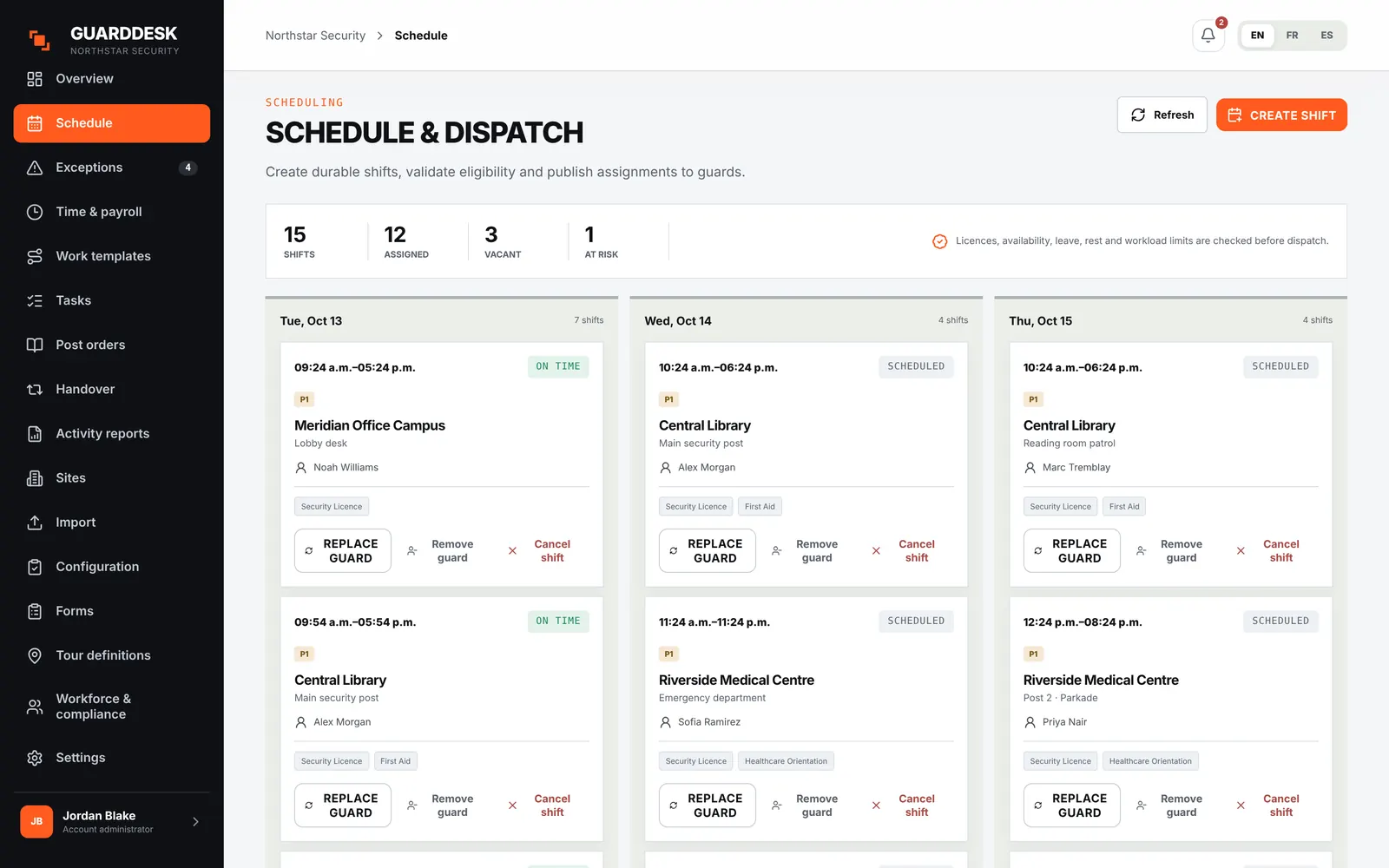
- Weekly schedules, shift offers and swaps
- Licence and certificate checks before every shift
- Overlap blocking and overtime flags
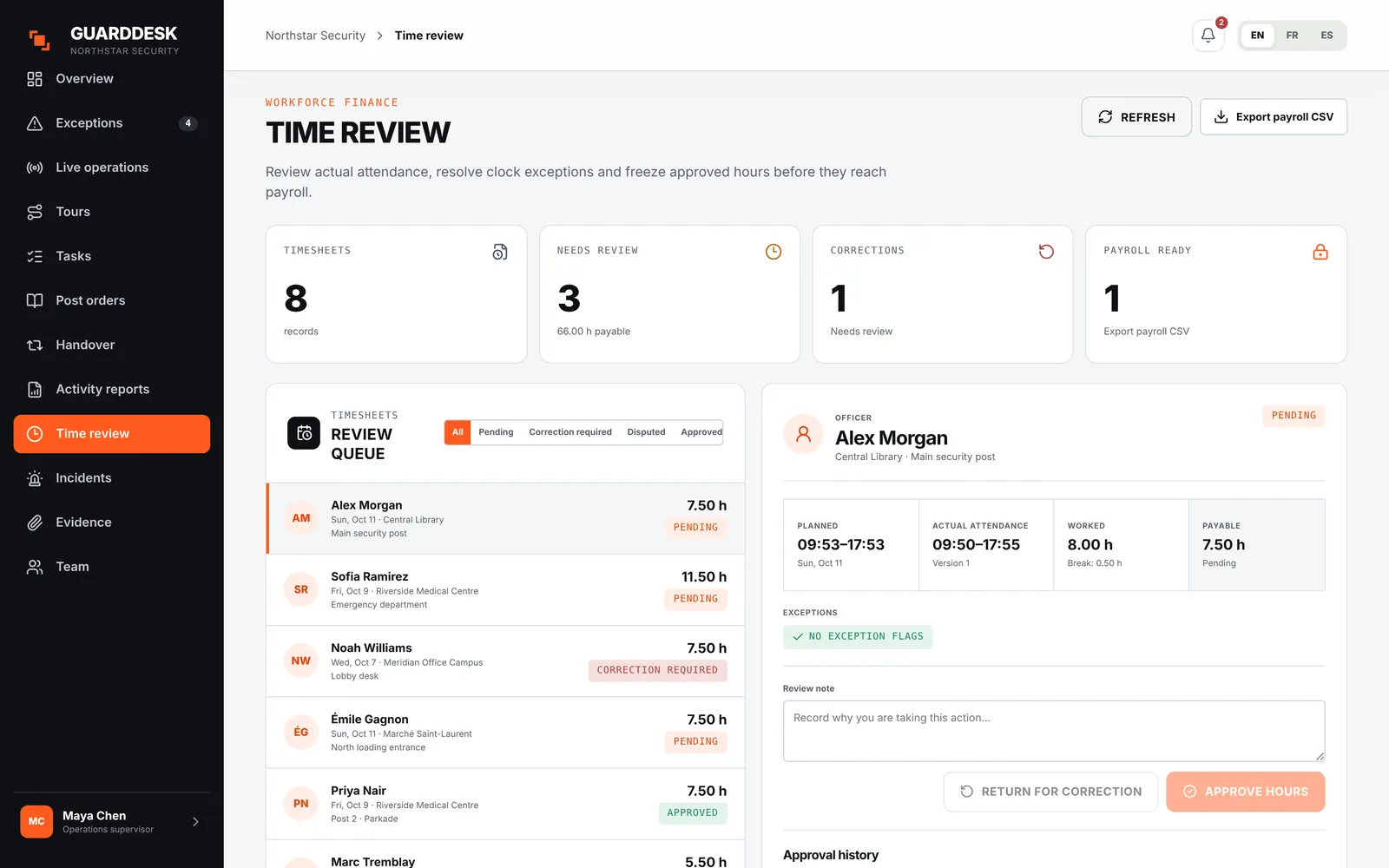
- Timesheets and payroll CSV
Security guard scheduling softwareSchedule guards who are allowed to work the post.
GuardDesk checks licences, site requirements, overlaps, overtime and (on Pro) rest rules before a shift is assigned, then sends it to the guard’s phone. Built for contract security firms with 20 to 150 guards.
From $9 per active guard per month · no setup fee · month to month
What changes for your dispatcher
TodayA guard with an expired licence gets put on a post because nobody checked the spreadsheet.
With GuardDeskAn expired licence blocks the assignment. Overriding it needs a reason, and the reason is recorded.
TodayA 2 a.m. call-out goes to a group chat and the first “yes” gets the shift, even if it puts them over 60 hours.
With GuardDeskThe open shift goes only to eligible guards, and the first to accept from the app gets it. Offers expire after 30 minutes.
TodayPayroll finds the overtime two weeks later.
With GuardDeskOvertime is flagged when the shift is planned, and again on the timesheet before the period locks.
Eligibility
One check on every way a shift gets filled.
Assigning, offering, swapping and replacing a guard all go through the same eligibility check, so the rule can’t be skipped by taking a different path.
- Licences and certificates
- Each guard’s licence and site certificates (first aid, healthcare orientation and so on) are checked against what the post requires, with expiry dates.
- Overlaps and rest
- Double bookings are blocked. On Pro, minimum rest between shifts and a rolling 7-day maximum are enforced too.
- Overtime threshold
- See who would cross the overtime threshold before you assign them, not on the pay run.
- Recorded overrides
- Supervisors can override with a reason. Every override is kept in the audit log.
Shift offers and swaps
Fill a sick call without ten phone calls.
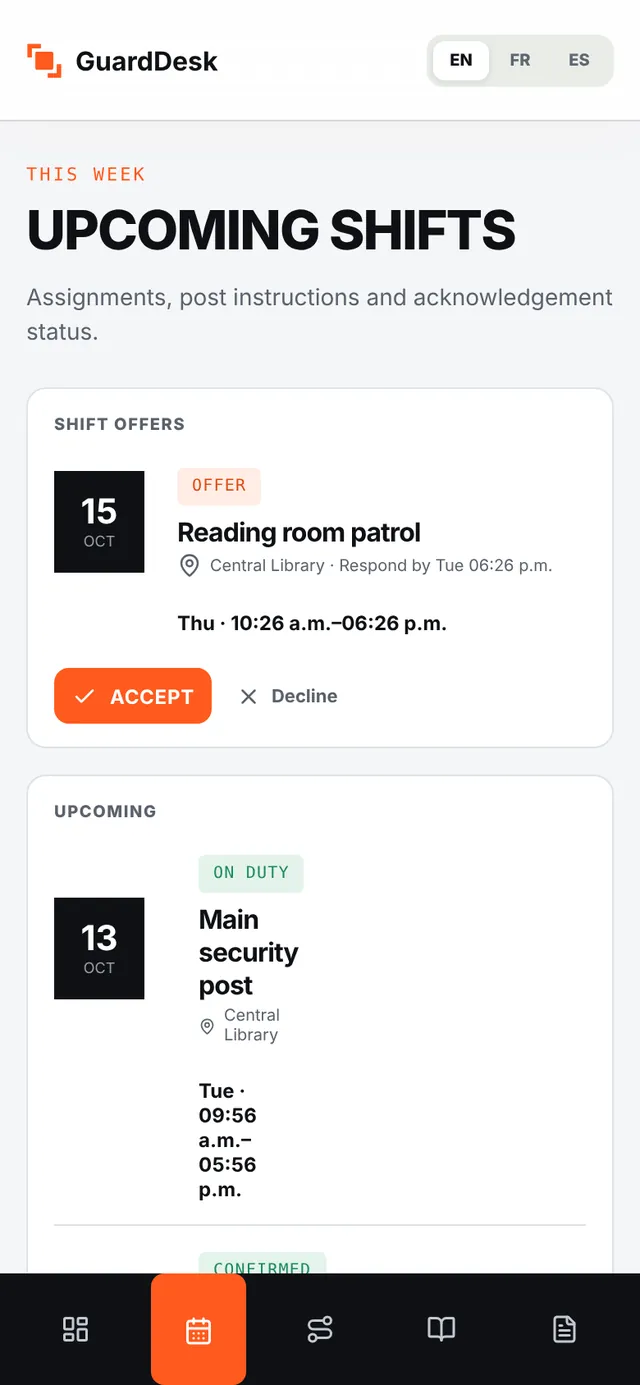
Offer an open shift to one guard or to every eligible guard at once. Guards accept from their phone and the schedule updates itself.
- Offer to eligible guards only
- Guards who would break a rule never see the offer.
- First to accept
- The first eligible guard to accept gets the shift. Offers expire after 30 minutes.
- Swaps, leave and availability
- Guards request from the app, dispatchers approve in the office app. Leave management is on Pro.
From schedule to payroll
The schedule becomes the timesheet.
Clock-ins from the guard app are matched to the planned shift. Late, missed and early clock events show up as exceptions while the shift is running.
- Automatic timesheets
- Built from clock events, per guard and per period.
- Disputes before lock
- Guards can dispute their hours from the phone before payroll closes.
- Payroll CSV
- One export for your payroll provider, with a completeness check.
Getting started
Running your schedule in a week
- 01 Send us your guard list, sites and current schedule. We import them, licences and expiry dates included. There is no setup fee.
- 02 Set the rules once. Post requirements per site, the overtime threshold and the rest rules your province requires.
- 03 Guards install the app. iPhone or Android, on their own phone. They see their shifts and accept offers right away.
- 04 Publish next week’s schedule. Anything that breaks a rule is flagged before it goes out.
Pricing
Scheduling is in both plans
No setup fee, no per-site fee, month to month. Starter has a $150 monthly minimum, Pro $250.
See pricing- Everything in Starter
- Rest between shifts and 7-day maximum enforced
- Recurring weekly schedules
- Leave management
Questions firms ask
Does GuardDesk replace our scheduling spreadsheet?
Yes. The schedule, the guard’s phone and the timesheet use the same shifts, so there is nothing to copy between them. We import your current schedule when you start.
Can it handle 12-hour shifts and 24/7 posts?
Yes. Shifts can cross midnight and be split, daylight-saving changes are handled correctly, and copy-week (plus recurring weekly series on Pro) makes a rotation quick to lay out. Our guide to 12-hour rotations shows how many guards a 24/7 post needs.
Which rules does it check before a shift is assigned?
On both plans: licences and site certificates with their expiry dates, overlapping shifts, and the overtime threshold. On Pro, minimum rest between shifts and a rolling 7-day maximum are enforced as well.
Do guards need a company phone?
No. The guard app runs on their own iPhone or Android phone, and keeps working offline.
What does it cost?
$9 per active guard per month on Starter, $14 on Pro, in Canadian dollars. You only pay for guards who worked a shift that month.